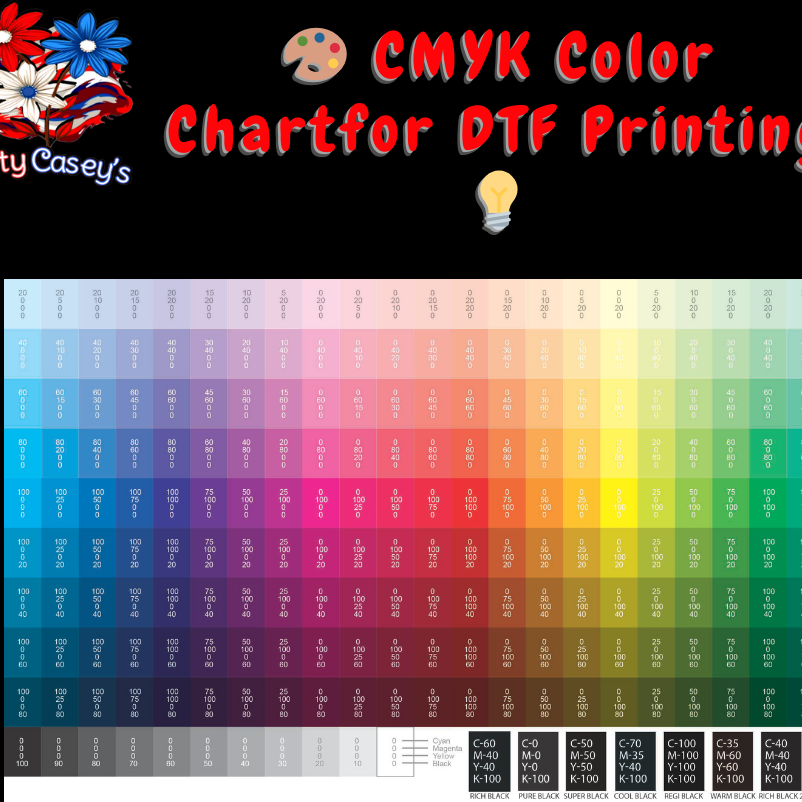
Add Color Chart For CMYK Color Matching
Add Color Chart For CMYK Color Matching
DTF FAQ
DTF FAQ
Our Direct to Film transfers are produced using a commercial DTF printer and can be printed up to 22 inches wide and 300 inches long. These transfers are designed to give you vibrant full-color prints, easy hot peel application, and a soft feel on the finished product.
They work well on cotton, polyester, blends, and many other compatible blanks.
DTF FAQ
Have questions about ordering DTF transfers, uploading artwork, gang sheets, or pressing your transfers? Here are answers to common DTF questions.
DTF Transfer Questions
What are DTF transfers?
DTF stands for Direct to Film. Your design is printed onto a special transfer film and then heat pressed onto compatible garments or blanks.
What can DTF transfers be used on?
DTF transfers work well on cotton, polyester, blends, and many other fabric types. They are commonly used on shirts, hoodies, crewnecks, tote bags, and more.
Do I need a heat press?
Yes. A heat press is recommended for best results. A household iron is not recommended because it does not usually provide even heat and pressure.
What size can you print?
Our DTF transfers are available up to 22 inches wide, with longer gang sheet lengths available depending on the product option selected.
Artwork Questions
What file type should I upload?
PNG files are preferred for DTF orders.
Does my artwork need to be 300 DPI?
Yes, 300 DPI is recommended for the cleanest print quality. Low-resolution or blurry artwork may print blurry.
Does the background need to be transparent?
Yes. Artwork should have a transparent background. Any white box, black box, shadow, watermark, ghost pixels, or extra marks may print exactly as uploaded.
What are ghost pixels?
Ghost pixels are tiny leftover marks around your design that may be hard to see on screen but can show up when printed.
Do you fix my artwork before printing?
Orders are printed based on the file provided. If your artwork needs editing, cleanup, resizing, background removal, or design help, please contact us before ordering. Additional design fees may apply.
Will my colors match exactly?
Exact color matching is not guaranteed. DTF printing uses CMYK printing, and colors can appear different from what you see on a phone, tablet, or computer screen.
Gang Sheet Questions
What is a gang sheet?
A gang sheet is one large sheet with multiple designs arranged together. This lets you fit several logos, images, or designs onto one print sheet.
Do I arrange the gang sheet myself?
Unless otherwise stated, customers are responsible for arranging artwork correctly on the gang sheet.
Can I put multiple designs on one gang sheet?
Yes. You can place multiple designs on one gang sheet as long as they fit within the selected sheet size.
Should I leave space between designs?
Yes. Leave enough space between each design so they can be cut apart easily after printing.
Pressing Questions
What temperature should I press DTF transfers at?
We recommend starting at 290–300°F.
How long should I press?
We recommend pressing for 5–7 seconds using medium pressure.
Are your transfers hot peel?
Yes, our transfers are generally hot peel. Peel the film hot using a smooth and even motion.
Do I need a second press?
Yes. We recommend a final press for 3–5 seconds using parchment paper, kraft paper, butcher paper, or a teflon sheet.
What if my transfer is not sticking?
Check your temperature, pressure, and press time. Most sticking issues are caused by not enough pressure, not enough heat, or not enough time.
Wash & Care Questions
How should I wash garments with DTF transfers?
Wash inside out using cold or warm water. Avoid bleach and harsh detergents.
Can the garment go in the dryer?
Yes, but tumble dry low is recommended. Hang drying may help extend the life of the design.
Can I iron over the design?
Do not iron directly over the design.
Order Help
What if I uploaded the wrong file?
Contact us as soon as possible. If your order has not been printed yet, we may be able to update the file. Once production has started, changes may not be possible.
Can I contact you before ordering?
Yes. If you are unsure about your artwork, sizing, gang sheet setup, or pressing instructions, please contact us before ordering.
Upload Guidelines
Upload Guidelines
Please upload PNG files only at 300 DPI with a transparent background.
Your artwork should be:
trimmed to size
free of ghost pixels
free of watermarks
free of background artifacts
Files will print exactly as submitted. We are not responsible for poor-quality or improperly prepared artwork.
DTF Artwork Requirements
To get the best results from your Crafty Casey’s DTF transfers, please make sure your artwork is print-ready before uploading.
Your design will print based on the file you provide. Please review the requirements below before placing your order.
AI-Generated Artwork
AI-generated artwork is accepted only if it is print-ready and meets our file requirements.
AI artwork often contains issues that may not be noticeable on screen but can affect printing, including:
- Blurry or low-resolution details
- Unwanted backgrounds
- Ghost pixels
- Extra marks or artifacts
- Incorrect or distorted text
- Poor edges
- Watermark-like marks
- Unclear design elements
- Artwork that is not properly trimmed to size
If submitted artwork is not acceptable for print, it may need to be edited, cleaned up, rebuilt, or redesigned before production. Additional artwork or design fees may apply.
Orders may be delayed until acceptable print-ready artwork is received or artwork services are approved and paid for.
Crafty Casey’s reserves the right to refuse any AI-generated artwork that is poor quality, inappropriate, trademarked, copyrighted, or not suitable for production.
File Requirements
- PNG files are preferred
- 300 DPI recommended
- Transparent background required
- Artwork should be trimmed to size
- Design should be uploaded at the size you want printed
- Avoid low-resolution, blurry, or pixelated images
- Do not upload screenshots for final print files
Transparent Background Required
Your artwork must have a transparent background. Any unwanted background, white box, black box, shadow, watermark, ghost pixels, or extra marks may print exactly as uploaded.
Please check your file carefully before submitting your order.
What Are Ghost Pixels?
Ghost pixels are tiny leftover marks around a design that may not be easy to see on your screen but can show up when printed.
Before uploading, make sure your background is fully removed and your design is clean.
Color Disclaimer
DTF printing uses CMYK printing. Colors may look slightly different from what you see on a phone, tablet, or computer screen. Screen brightness, monitor settings, and file color settings can affect how colors appear.
We do our best to provide bright, vibrant prints, but exact color matching is not guaranteed unless discussed before ordering.
Customer Responsibility
Customers are responsible for uploading print-ready artwork. Crafty Casey’s is not responsible for spelling errors, low-resolution artwork, unwanted backgrounds, incorrect sizing, or design issues in the uploaded file.
If your file needs editing, cleanup, resizing, or design work, please contact us before ordering.
Artwork Must Be Trimmed to Size
All uploaded artwork must be trimmed/cropped to the actual edge of the design before submitting your order.
Please do not upload artwork with extra blank space, large transparent borders, white boxes, black boxes, screenshots, watermarks, shadows, unwanted backgrounds, or extra marks around the design.
Your design will be printed based on the file provided. If your file includes extra space or unwanted elements, those may affect the final print size or print exactly as uploaded.
Before uploading, please check that:
- The background is fully transparent
- The design is trimmed tightly to the artwork
- There are no ghost pixels or leftover marks
- There are no white, black, or colored boxes behind the design
- The artwork is sized correctly
- The spelling and design details are correct
No Refunds for File Issues
Crafty Casey’s prints DTF transfers based on the artwork file provided by the customer.
No refunds, reprints, or credits will be given for issues caused by customer-provided artwork, including but not limited to:
- Files with backgrounds
- Files that are not transparent
- Ghost pixels
- Watermarks
- Low-resolution or blurry artwork
- Artwork not trimmed to size
- Incorrect sizing
- Spelling errors
- Extra marks, shadows, boxes, or unwanted design elements
- Incorrect file uploads
- Gang sheets arranged incorrectly by the customer
Please review your file carefully before submitting your order. If you need help with artwork cleanup, resizing, background removal, or design setup, please contact us before ordering. Additional design fees may apply.
Color Notice
Color Notice
DTF printing uses CMYK, not RGB, so colors may vary slightly from what you see on your screen.
For best results:
save artwork in CMYK when possible
understand that screen colors and printed colors will not match exactly
We do our best to get colors as close as possible, but exact color matching is not guaranteed.
Rasterization Option
Rasterization Option
Rasterization is available as an optional add-on for $5.00 per sheet.
Rasterization breaks solid areas into a micro-pattern to help create:
a softer feel
better flexibility
improved comfort on larger solid designs
This option is especially helpful on artwork with large dense color areas.
About Our DTF Transfers
Crafty Casey’s DTF transfers are professionally printed using commercial Direct to Film equipment for bright, full-color designs with a soft feel and easy application.
Our transfers are great for small businesses, boutiques, crafters, events, teams, schools, and anyone needing high-quality custom apparel prints.
Why Customers Love Our DTF Transfers
- Commercial-quality DTF printing
- Bright, vibrant full-color designs
- Soft feel after pressing
- Works on cotton, polyester, blends, and more
- Great for shirts, hoodies, bags, and other compatible blanks
- Hot peel for fast and easy application
- Available in gang sheets up to 22 inches wide
Important Before You Order
For the best results, uploaded artwork should be print-ready before submitting your order. Artwork should be high resolution, have a transparent background, and be sized correctly.
Unwanted backgrounds, ghost pixels, watermarks, shadows, or extra marks may print exactly as uploaded.
Custom DTF transfers, gang sheets, personalized items, made-to-order products, embroidery, and custom printed items are non-refundable once production has started. No refunds, reprints, or credits will be given for customer-provided file issues, including backgrounds, ghost pixels, watermarks, low-resolution artwork, incorrect sizing, spelling errors, or artwork not trimmed to size.
Need Help?
Before placing your order, please review our DTF help pages:
- DTF Artwork Requirements
- DTF Pressing Instructions
- DTF FAQ
Ready to Order?
Upload your artwork, choose your size, and let us print your custom DTF transfers.
Pressing Instructions
Pressing Instructions
Recommended pressing steps:
Pre-press your blank substrate to remove moisture and wrinkles
Set heat press to 290–300°F
Use medium pressure
Press for 5–6 seconds
Peel transfer
Press a second time for 10 seconds with a teflon sheet or cover sheet
Pressing results may vary depending on the material being used.
DTF Pressing Instructions
Follow these recommended pressing instructions for the best results with your Crafty Casey’s DTF transfers. These settings are a general guide and may need small adjustments depending on your heat press, garment type, and environment.
For best results, always test one transfer before running a full order.
Recommended Application Settings
Temperature: 290–300°F
Press Time: 5–7 seconds
Pressure: Medium pressure
Peel Type: Hot peel
Final Press: 3–5 seconds with parchment paper, kraft paper, butcher paper, or a teflon sheet
How to Apply Your DTF Transfer
Step 1 — Pre-Press the Garment
Pre-press the garment for 2–5 seconds to remove moisture and wrinkles. Make sure the garment is flat and free of lint or debris.
Step 2 — Position the Transfer
Place the DTF transfer on the garment in the desired location with the design facing up. Make sure it is straight and smooth before pressing.
Step 3 — Press the Transfer
Press at 290–300°F for 5–7 seconds using medium pressure.
Step 4 — Peel Hot
After pressing, peel the film hot in a smooth and even motion.
Step 5 — Final Press
Cover the design with parchment paper, butcher paper, kraft paper, or a teflon sheet and press again for 3–5 seconds. This helps improve the finish, durability, and feel of the transfer.
Tips for Best Results
- Pre-press every garment before applying your transfer
- Make sure the garment is smooth, flat, and lint-free
- Pressure matters just as much as temperature
- Avoid overpressing
- Test one transfer before a full run
- Different garment brands and fabric blends may require slight adjustments
- DTF transfers work well on cotton, polyester, blends, and many other fabrics
Troubleshooting
Transfer is not sticking
Check your temperature, pressure, and press time. Most sticking issues are caused by not enough pressure, not enough heat, or not enough time.
Edges are lifting
Make sure the garment is flat and the pressure is even. Complete a final press with a cover sheet.
Transfer looks dull
The transfer may have been pressed too long or too hot. Lower the temperature or press time slightly and test again.
Film is difficult to peel
Peel the film while it is still hot using a smooth, even motion.
Results vary from shirt to shirt
Different garment brands, fabrics, humidity, and heat presses can all affect results.
Wash & Care After Pressing
- Wash inside out
- Use cold or warm water
- Avoid bleach and harsh detergents
- Tumble dry low or hang dry
- Do not iron directly over the design
Need help with your transfer order? Contact us before pressing your full order.
Important Notes
Important Notes
Customers are responsible for:
gang sheet layout
artwork placement
spacing
uploaded file quality
We are not responsible for:
low-resolution artwork
ghost pixels or watermarks left in files
exact color matching
gang sheet alignment errors submitted by the customer
Production Turnaround Times
Thank you for shopping with Crafty Casey’s. Please review our estimated production turnaround times before placing your order.
Production time is the time it takes us to make your order. Shipping time is separate and begins after production is complete.
Turnaround time does not begin until:
- Payment has been received
- Artwork is print-ready
- Required order details are complete
- Digitizing is completed, if embroidery is required
- Invoice and/or proof has been approved, if applicable
- If changes are made to artwork or blanks the turnaround time starts over.
Business Day Definition
A business day is Monday through Friday, excluding weekends, holidays, posted closure dates, and days we are not in production.
Orders, artwork, approvals, or payments received after 2:00 PM CST may be considered received on the next business day.
Production turnaround times do not include weekends, holidays, shipping time, pickup delays, or time spent waiting for customer responses, artwork corrections, invoice payment, proof approval, or missing order details.
Business days do not include weekends, holidays, shipping time, or time spent waiting for customer responses, artwork corrections, invoice payment, or proof approval.
Estimated Production Times
| Product Type | Estimated Turnaround Time |
|---|---|
| DTF Transfers & Gang Sheets | 2–3 business days after print-ready artwork and payment are received |
| Rush DTF Orders | May be ready within 24 hours if print-ready artwork is received by 2:00 PM and rush availability is approved |
| Custom Apparel | Up to 14 business days after artwork/proof approval |
| Embroidery | 10–21 business days after artwork approval, digitizing, and thread/design details are complete |
| Drinkware, Hats & Accessories | Up to 14 business days after artwork/proof approval |
| Wholesale & Bulk Orders over 15 items | Case-by-case basis, typically no longer than 21 business days after artwork is ready and approved |
DTF Transfers & Gang Sheets
DTF transfers and gang sheets are typically completed within 2–3 business days once payment has been received and artwork is print-ready.
Artwork must be high resolution, transparent, trimmed to size, and free of unwanted backgrounds, ghost pixels, watermarks, or extra marks.
Orders with file issues may be delayed until corrected artwork is received.
Rush DTF Orders
Rush DTF orders may be available depending on our current workload.
To qualify for possible 24-hour rush turnaround:
- Artwork must be print-ready
- Artwork must be received by 2:00 PM
- Payment must be received
- Rush order must be approved by Crafty Casey’s
- Rush fee may apply
Rush orders are not guaranteed unless confirmed by Crafty Casey’s.
Custom Apparel
Custom apparel orders may take up to 14 business days after payment, artwork approval, and proof approval when applicable.
Turnaround may vary depending on garment availability, order size, design details, and current production volume.
Embroidery
Embroidery orders typically take 10–21 business days after payment, artwork approval, digitizing, thread selection, and final approval.
New embroidery designs may require additional setup time for digitizing and stitch testing.
Drinkware, Hats & Accessories
Drinkware, hats, and accessories may take up to 14 business days after payment, artwork approval, and proof approval when applicable.
Production time may vary based on product availability and customization details.
Wholesale & Bulk Orders
Wholesale, branded merch, fundraiser merch, and bulk orders of more than 15 items are handled on a case-by-case basis.
Most approved bulk orders are completed within 21 business days after payment, artwork approval, and all required order details are complete.
Larger or more complex orders may require additional time.
Important Notes
Production may be delayed if:
- Payment has not been received
- Artwork is not print-ready
- Artwork needs cleanup or resizing
- Digitizing is required
- A proof or invoice has not been approved
- Product blanks need to be ordered
- Customer changes are requested after approval
- Required details are missing
If your order is needed by a specific date, please contact us before placing your order to confirm whether the deadline can be met.
Local Pickup Reminder
Selecting local pickup does not mean your order is ready immediately and does not mean your order will be delivered.
Please wait for a Ready for Pickup notification or direct confirmation before arriving. Pickup is by confirmed appointment or pickup window only.
Shipping Reminder
Shipping time is separate from production time. Once your order is handed over to the shipping carrier, delivery time is controlled by the carrier.
Business Day Definition
A business day is Monday through Friday, excluding weekends, holidays, posted closure dates, and days we are not in production.
Orders, artwork, approvals, or payments received after 2:00 PM CST may be considered received on the next business day.
Production turnaround times do not include weekends, holidays, shipping time, pickup delays, or time spent waiting for customer responses, artwork corrections, invoice payment, proof approval, or missing order details.
Share